
Image Sources: Where to Find Images
Images are a key part of making your article successful on Google. Having a good quality image with the correct Alt Text and Caption can make all the difference in getting your article noticed. In this article, we’re going to talk about where to look for images.
Image sources will be different depending on the site you’re writing for and the topic you’re writing about. Most importantly, images must be free to use, or we must have the proper authorization to use them. Even then, the image must be correctly attributed/credited to the copyright owner.
*Note that all links to tools and sources can also be found in the “Image Tools & Sources” resource.
Free Image Sources
Free image sources are most often used for lifestyle topics on the Entertainment site, but they can also be useful for other topics. Sometimes a specific image isn’t available, and a more generic one is needed.
Approved Free Sources:
*Before using images from a site that isn’t listed, ask in your site’s Chat on Slack to find out if the source is acceptable.
IMAGN
IMAGN is a paid image resource. These images can only be used on Total Apex Media websites. Use outside of this is prohibited and will result in termination.
Images on IMAGN are mainly celebrities and sporting events. These are suitable for articles about high-profile celebrities, athletes, and games.
- Login: totalapexmedia@gmail.com
- Password: ApexMedia-247$
- Log in to IMAGN, then perform your search.
- Once you’ve found the image you want to use, click on it.
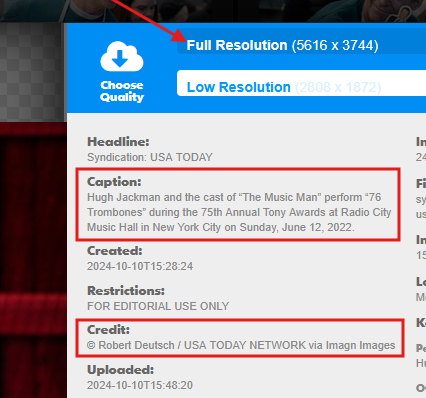
- Click Download.
- Click Full Resolution.
- The Caption and Credit are needed for correct attribution on WordPress.
IMDB
IMDB is another free source for images. This is most often used for Entertainment topics related to movies, TV shows, and streaming.
It is very important to choose only images that are screenshots from a show or movie, official posters, or promotional images.
Never use a photo of celebrities taken outside the actual movie or show. For example: red carpet photos, awards shows, etc.
Image Extractor is a very useful tool for downloading images from IMDB without the overlaying menus.
Steam
Steam is a widely used platform for gaming. It’s a useful resource for game screenshots.
Official Sources
You can also look for official Press Kits or Media pages on official websites. For example, Disney+ has a site where you can find Press Kits, Logos, and other materials journalists can use.
If the source isn’t listed in our “Image Tools & Sources” resource, ask in your site’s Slack Chat channel before using images from that source.
Screenshots
Finally, you can use screenshots you took yourself. Screenshots can be taken from official YouTube videos, such as a movie trailer. They can come from a show or movie itself while you’re streaming it. They can also come from a game you are playing.
In fact, if you’re playing a game with the purpose of reviewing it, you should capture screenshots to use in your article.
The Wrap Up
We’ve discussed many of the sources you can use for images to be placed in your articles. This isn’t completely comprehensive, though. If you find a source you think would be usable, you must get permission from a site manager through your site’s Slack Chat before using any image from that source.
Remember: When in doubt, reach out!