
How to: Meta Descriptions
Meta descriptions are short tag lines designed to hook a potential reader into selecting your article in search results. When someone does an internet search, they see the title of the article and then the meta description. Maybe they will see your featured image. So the meta description is almost as important as your title for drawing someone to choose your article over other search results.
What the Meta Description Includes
The meta description is short, up to 160 characters. It could be less depending on the characters used. For example, punctuation like & or $ have higher values than a simple letter.
The meta description must include the Focus Keyword. It should be one or two sentences, and it must be descriptive of the content in the article.
Example: Season 5 of “Bridgerton” is now available on Netflix, and we’ve already watched it, so you can know if it’s worth your time! No spoilers!
How to Add the Meta Description
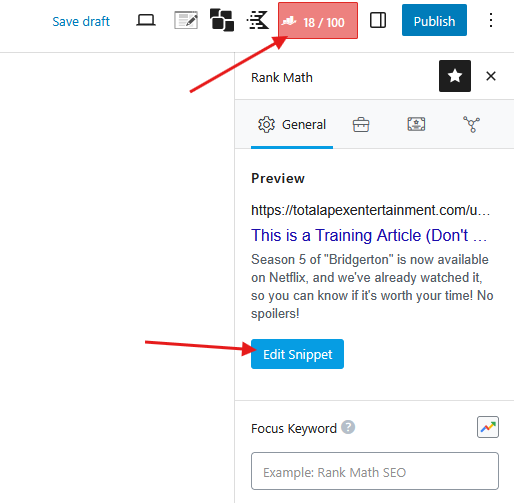
To add the meta description, click the RankMath button in the upper right. Then click “Edit Snippet.”
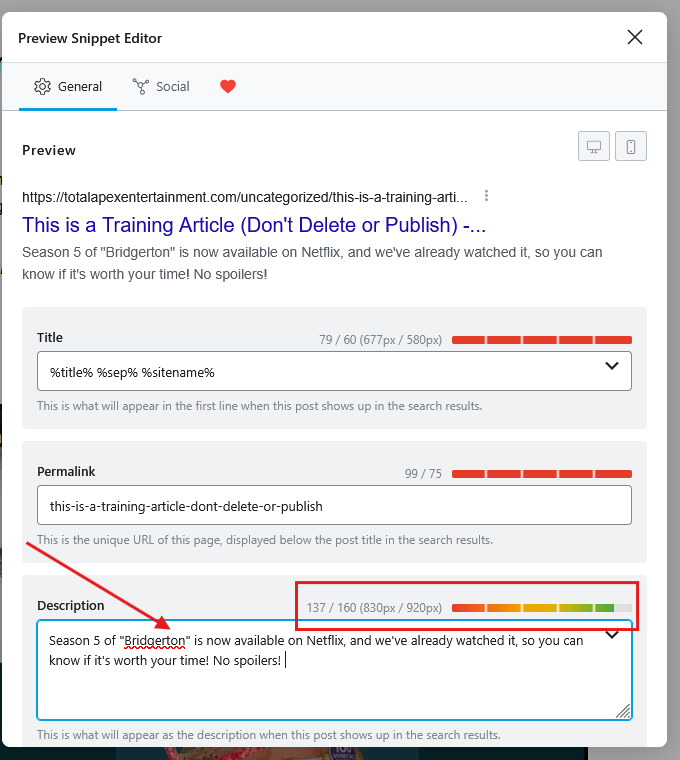
Add your meta description in the “Description” field. Do NOT change anything else in the Edit Snippet window.
As you type, the colored bar will start red and progress to green. It is required for the bar to be filled to that last segment on the right, the greenest green. If it doesn’t, it is too short. If it fills all the way and turns red, the meta description is too long.
A Case for AI
This is one time when you can use an AI to help you. Large language models (LLMs) like ChatGPT, Copilot, and Gemini can be good tools when used ethically. If you’re struggling with a meta description, you can copy your entire article and paste it into the LLM of your choice with the following prompt:
Please create a meta description for the following article. It should be optimized for Google SEO, less than 160 characters, and include the keyword, “______.”
Wrapping it Up
The meta description is an important piece of your article. It may seem complicated at first, but with practice, you can get the hang of it! And, as with anything else, we’re here to help you. If you have a question, post it in the Slack chat channel for your site.
When in doubt, reach out!