Links: For SEO, Sources, and More
Adding links to your article is required for multiple reasons. They improve SEO, connect information to primary sources, and provide additional helpful information to the reader.
Choosing Appropriate Links
All articles must have at least 2 internal links and 2 external links. For most articles on the Entertainment verticals, you’ll need no more than 2 external links. For some articles, like listicals, reference products we’re recommending; link to each product. If you have questions about what to link, please ask. We’re here to help.
All links should lead to relevant content. For example, if you’re writing an article about Christmas, you wouldn’t link to an article about pizza unless you’re suggesting pizza for dinner on Christmas. Or, if you’re writing about the Winter Olympics, you wouldn’t link to an article about boxing since it isn’t a winter sport.
Sources
You should always link to sources. For example, if you include a direct quote from someone, you must state where the quote came from and link to the primary source of the quote. Or, if you’re stating information that isn’t general knowledge, you should both cite the source and link to it. More on this in Citations.
How to Add Links in WordPress
Adding links to your article in WordPress is a simple process, and we’ll break it down for you here.
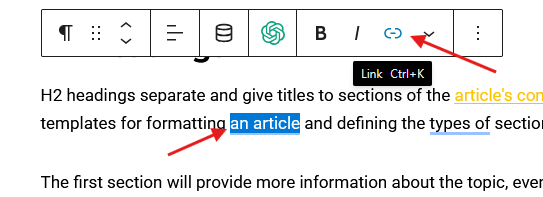
1. For both internal and external links, highlight the word(s) you want to anchor the link to.
2. A menu bar will appear. Click the link icon/button.
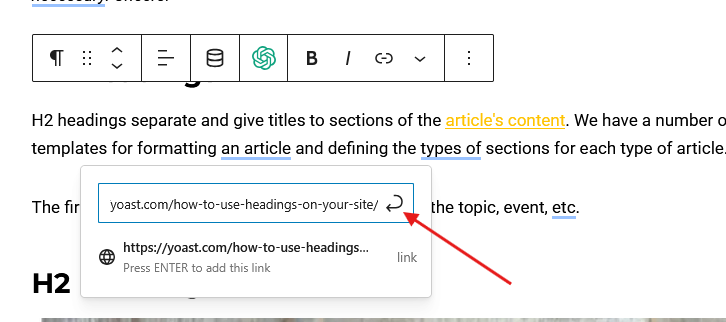
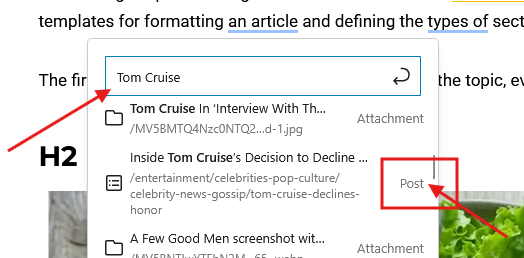
3. A new box will appear. For external links, paste the URL. For internal links, begin to type to search for a relevant article. You can also search by article title if you know the article you’re looking for. For internal links, choose a Post or a Tag, never an Attachment.
4. Click the arrow to submit the change, and the link will be anchored to the article text.